

"Navigate Your Future: Soft Profile, Your Personal Guide."
Project Team
2 UX Designers
2 Developers
2 Product Managers
Project Duration
June 2022 - Oct 2022
Tools
Adobe XD
Key Responsibilities
UX Research, UX Design, Ideation, Prototyping, Micro-interaction,
Design Library
Overview
-
Designed and created a prototype for the "Soft profile favorite feature," allowing students to easily favorite multiple degrees and access them in one location on the dashboard.
-
Developed micro-interactions to showcase different user scenarios and enhance developers' understanding of the favorite feature.
-
Designed and optimized soft profile components, establishing a comprehensive soft profile library for future use by designers and developers.
-
Conducted analysis of Fullstory recordings to assess user engagement with the soft profile tool, including the number of users, their interactions, and dashboard usage.

Soft Profile Dashboard
At a glance
Brief overview of the entire project
What is Soft Profile?
The Soft Profile is a personalized tool designed for prospective ASU Online students, offering a seamless exploration experience with minimal barriers to entry. By utilizing the user's persona and input data, the tool tailors content to match their unique education goals and interests.
Key Features:
-
Personalized Content: Based on the user's preferences and persona, the Soft Profile provides personalized content, including degree suggestions and relevant educational programs.
-
Next Steps Checklist: Users are guided through their exploration journey with a helpful checklist, ensuring they discover content that aligns with their educational aspirations.
-
Degree Suggestions: The Soft Profile presents a range of degree options related to the user's interests, helping them explore various academic paths.
-
Save Options: Users can easily save their research progress, allowing them to conveniently return to their saved content and continue their exploration at any time.
Overall, the Soft Profile is an efficient and user-friendly tool that empowers potential ASU Online students to find the information they need, fostering a smooth and personalized exploration process.
Problem
-
Inconvenience in Revisiting Degrees: Prospective ASU Online students face difficulty in revisiting degrees of interest. They have to navigate to each degree page repeatedly to access information, leading to a time-consuming and cumbersome experience.
-
Difficulty in Comparing Degrees: Students find it challenging to compare multiple degrees side by side to make informed decisions about their academic goals. Without an easy way to compare degree options, they might struggle to choose the best-fit program.
-
Missed Opportunities to Explore New Degrees: Prospective students often encounter new degree options but struggle to remember and revisit them later. As a result, they may miss out on exploring additional academic programs that align with their interests.
Solution
-
Introducing the "Soft Profile Favorite Feature": To address the inconvenience in revisiting degrees, the Soft Profile Favorite Feature allows students to easily favorite multiple degrees. By clicking the favorite icon on each degree page, students can quickly save their preferred degrees in one centralized location.
-
Efficient Degree Comparison: With the "Soft Profile Favorite Feature," students can now compare their favorite degrees side by side on the Soft Profile Dashboard. This streamlined comparison process empowers them to make well-informed decisions about their academic pursuits.
-
Never Miss Out on New Degrees: The "Soft Profile Favorite Feature" ensures that prospective students never miss opportunities to explore new degrees. By saving degrees as favorites, they can conveniently revisit their interests at any time and stay up-to-date with new program offerings.
Introducing Soft Profile Favorite Feature
What is Soft profile favorite feature?
The Soft Profile Favorite Feature is a functionality within the Soft Profile tool that enables students to easily favorite multiple degrees either from the degrees page or specific degree pages. By utilizing this feature, students can access all their favorite degrees in one centralized location on the Soft Profile Dashboard.
My Role
-
As part of phase one of the project, my responsibility was to design an end-to-end UX prototype for the Soft Profile Favorite Feature.
-
Using Adobe XD, I created a comprehensive prototype that showcased the feature's functionality and interactions.
-
To aid developers in understanding user scenarios, I also designed a micro-interaction for a seamless user experience.
Video Demonstration
-
To provide a visual representation of the Soft Profile Favorite Feature, I created a video demonstration showcasing how students can utilize the feature to favorite degrees and access them conveniently through the Soft Profile Dashboard.
-
With the Soft Profile Favorite Feature, students can effortlessly manage their preferred degrees, streamlining their exploration process and empowering them to make well-informed decisions about their academic journey.
How it works?
I addressed the challenge of having different views (list view and card view) without a unified favorite feature on the website. After conducting research, I designed a single component with different states for the favorite icon, which was not available previously.
This solution ensures a consistent and user-friendly experience for students, allowing them to easily favorite their degrees regardless of the view they are using within the Soft Profile tool. The implementation significantly improved accessibility and usability, enhancing the overall user satisfaction.

Degree page - list view

Degree page - card view
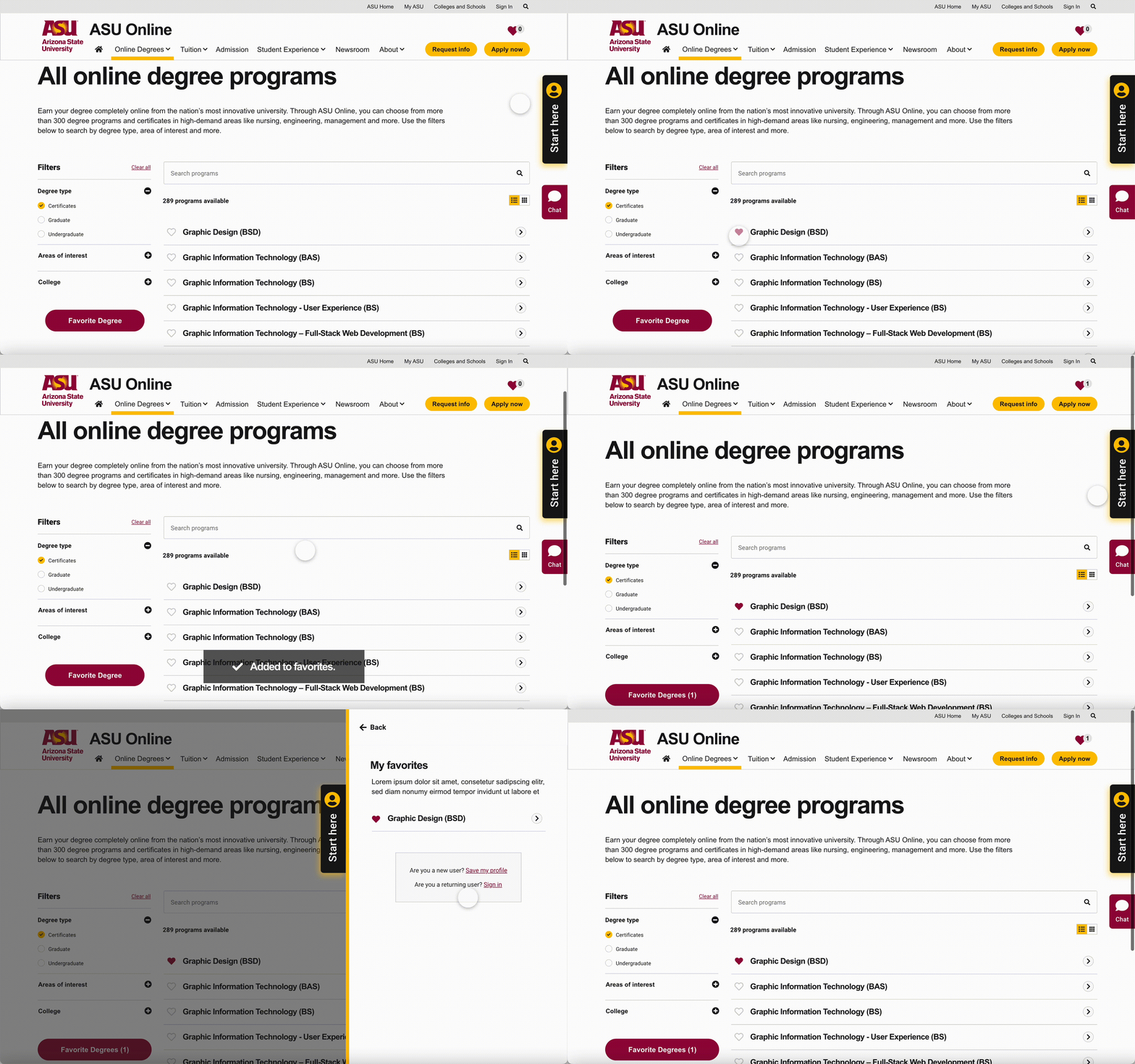
How soft profile favorite feature works

Prototype flow
To facilitate a better understanding of the feature for developers, I crafted various use case scenarios showcasing the interactions between each artboard. These use cases illustrated how students engage with the favorite feature while exploring degrees.

Different use case scenarios
The Soft Profile Favorite Feature allows students to effortlessly favorite multiple degrees and conveniently access them on the Soft Profile Dashboard. This intuitive feature streamlines the degree exploration process, empowering prospective ASU Online students with a user-friendly tool to manage their academic interests and make well-informed decisions about their educational journey.
Design library
Introducing the Soft Profile Library
What is Soft profile library?
The Soft Profile Library, meticulously created and optimized, offers a centralized repository of diverse soft profile components. With the library's publication, it empowers designers and developers with quick and effortless access to standardized components, ensuring design consistency across the Soft Profile platform. Moreover, components tailored to each soft profile screen facilitate seamless updates, enabling designers to effortlessly apply necessary changes to specific screens from the library, thereby promoting a more efficient and streamlined design process.
Problem
-
Inconsistent Design: Designers face challenges in maintaining consistency across the Soft Profile platform due to the absence of a centralized design repository. This leads to variations in design elements and components, resulting in a fragmented user experience.
-
Time-Consuming Updates: Making changes and updates to individual Soft Profile screens without a dedicated library becomes time-consuming and error-prone. Designers and developers have to manually adjust each instance, slowing down the design process.
-
Version Control Difficulties: The lack of version control makes it challenging to track changes and maintain design consistency. Without a clear record of modifications, it becomes harder to manage and coordinate design updates.
Solution
-
Centralized Soft Profile Library: The Soft Profile Library was introduced as a comprehensive repository of design components and elements. It addresses the issue of inconsistent design elements by providing a standardized approach to design, promoting a cohesive user experience.
-
Efficient Updates with Library Integration: Integrating the Soft Profile Library streamlined the design process by allowing designers and developers to apply updates across the platform more efficiently. This streamlined approach reduces the likelihood of errors and accelerates design and development efforts.
-
Versioning and Documentation: To enhance version control, a versioning system was implemented within the Soft Profile Library. This system allows for clear documentation of component changes, fostering transparency and enabling better collaboration among team members. The versioning feature empowers designers to track and manage design updates seamlessly.
My role
-
As the UX designer, I took charge of crafting and optimizing the array of soft profile components that now form an integral part of the Soft Profile Library.
-
With a focus on enhancing design consistency and accessibility, my role extended to publishing the library for the benefit of other designers and developers.
-
By creating components for each soft profile screen, I ensured that colleagues could effortlessly implement updates with just a few clicks, encouraging a collaborative and cohesive design approach throughout the development of the Soft Profile tool.
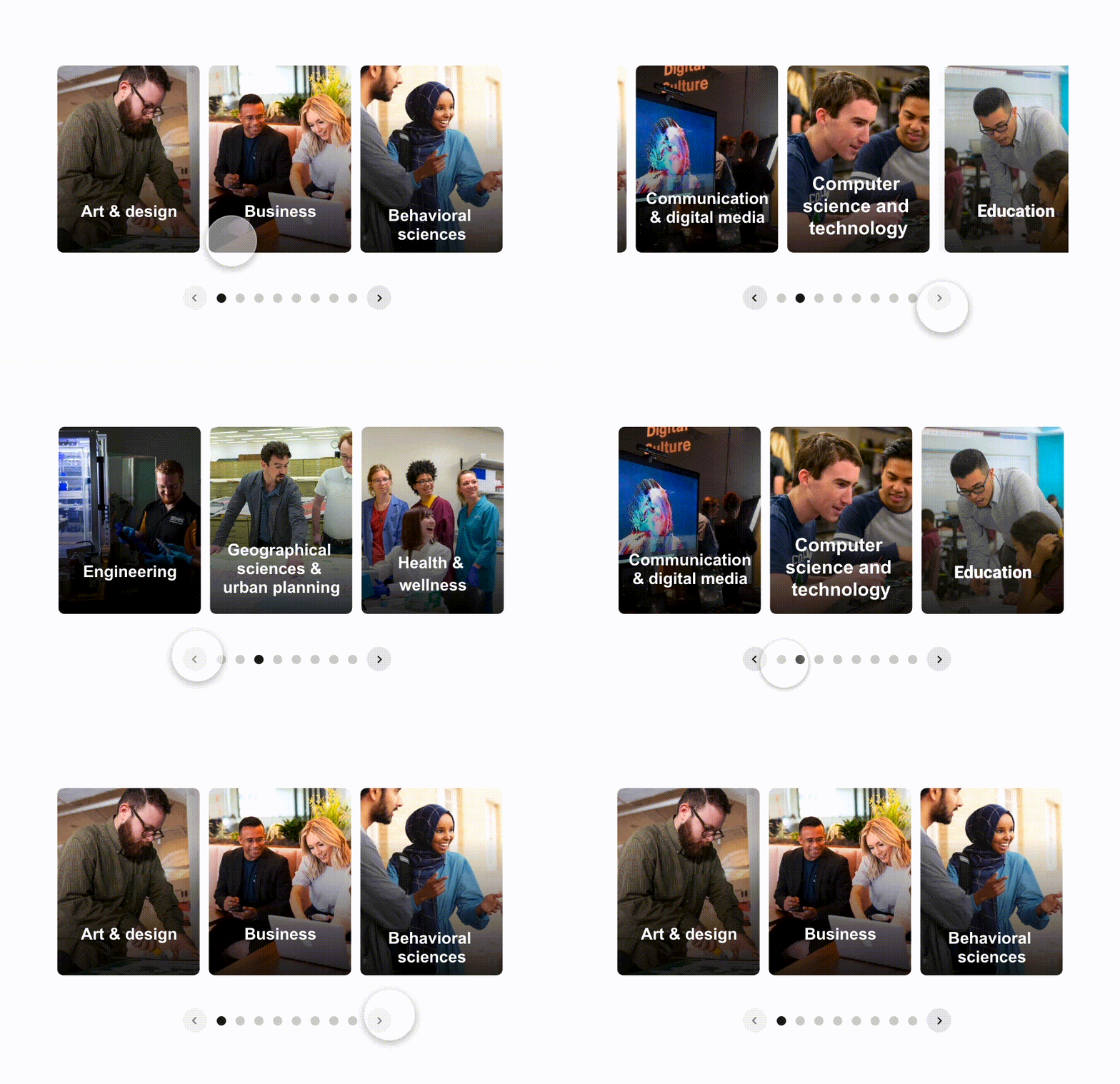
Degree carousel


Degree and Interest cards

Avatars

Soft profile screens
The centralized Soft Profile Library streamlines design, offering standardized components for a cohesive user experience. With tailored elements for each screen, updates become effortless, fostering efficient collaboration among team members. Elevate the Soft Profile tool, empowering prospective ASU Online students on their academic journey.
Impact
-
User Engagement Boost: The Soft Profile Favorite Feature prototype demonstrated a notable increase in user engagement, encouraging prospective ASU Online students to explore degrees further and save their preferences conveniently.
-
Streamlined Design Process: The introduction of the Soft Profile Library streamlined the design and development process significantly, resulting in faster updates and greater design consistency across the platform.
-
Positive User Feedback: Early feedback from users who experienced the Soft Profile Favorite Feature prototype has been overwhelmingly positive, with a majority expressing enthusiasm for the intuitive degree management feature.
-
Time and Resource Savings: With the Soft Profile Library, designers and developers experienced time savings of up to 30% on design iterations and updates, enabling them to focus more on optimizing the overall user experience.
What did I learn?
-
User-Centric Perspective: Embracing different perspectives on my solutions proved invaluable in understanding their effectiveness and suitability. Learning from diverse feedback allowed me to make informed decisions and optimize the Soft Profile tool for the end-users.
-
Micro-Interactions' Impact: I discovered the significance of well-executed micro-interactions. By crafting subtle, delightful interactions, I could positively influence users' perception of the product, enhancing user satisfaction and overall experience.
-
Resourceful Prototyping: I honed my prototyping abilities by being resourceful in seeking knowledge. Engaging with walkthroughs and tutorials empowered me to acquire new techniques and strategies, enabling me to refine and elevate the Soft Profile tool's design and functionality.
Future Consideration
-
AI Chatbot Integration: Replace Soft Profile with an AI chatbot to offer real-time personalized content and degree recommendations, creating a seamless and user-friendly exploration experience.
-
In-chat Favorite Feature: Implement the Favorite Feature within the AI chatbot to enable users to easily save and access preferred degrees directly from the chat interface.
-
Advanced Personalization: Leverage AI capabilities for more tailored content and degree recommendations based on user preferences, interests, and interactions with the chatbot.
-
User Feedback and Iteration: Continuously gather and analyze user feedback to refine the chatbot's functionality, ensuring it meets the evolving needs of prospective ASU Online students.